This tutorial is now available as a thirty second short video with frame-by-frame analysis of how the left and right foot moves to achieve the levitation effect.
The video shows how attention is drawn to the leading front foot which appears to hover in the air and how the trailing back foot is the one that in fact does the work to maintain the highly effective illusion of walking on air.
Since October 2023, TikTok users have been captivated by the dance video posted by Korean student Lee Hyo-cheol, where he seemingly glides magically off the ground.
The so-called Slickback dance move, named after the song “A Pimp Named Slickback” it is set to, now has several videos devoted to it racking up over 2 billion views.
Lee moves in a way that makes it seem like he is able to step so hard on the air that he can get purchase on it and float above the ground.
Lee modified a dance move created by YouTuber and TikTokker Jubi2fye in early 2022. The “Jubi Slide”, as it is known, looks somewhat like a sideways moonwalk.
The new move focuses more on the striking out of the heels than the sliding, “moonwalk” movement and traverses some distance on the ground rather than being confined to a single spot.
Links to Lee’s original TikTok @wm87.4 account video and a “tutorial” by @gkocoach are available at:
A fundamental concept is attention i.e. the adding of context and meaning to individual words by considering each individual word against each of the other words surrounding it.
For example, if a sentence contains the word ‘bank’ then the presence of ‘money’ in the same sentence suggests that means a financial institution rather than a river bank.
Attention is implemented in code using query (q), key (k) and value (v) vectors and there are some analogies like this one, which regards the key/value/query concept as similar to retrieval systems. For example, “when you search for videos on Youtube, the search engine will map your query (text in the search bar) against a set of keys (video title, description, etc.) associated with candidate videos in their database, then present you the best matched videos (values).”
This analogy raises as many questions as it answers however
What is the query? – the whole of the text we provide to the AI interface (ChatGPT, Bard, etc) or just a single word?
How is the query stored in a matrix?
What kind of key is the query matched against?
How does the key relate to the value?
Is the value something we get as an output from the process or something the model already possesses from previous training?
What is the point of the value we get from this whole process? How does it relate to generating a response to the text we enter into things like ChatGPT or Bard?
To answer these questions, I found this video which provides a great practical explanation of the model that is simultaneously proven as demonstrably correct through being implemented as working code with a small scale test case that can be trained and run in minutes on the free Google Colab platform.
Karparthy (1:04:15, 1:08:00) describes the query (q) as “what am I looking for” (“I” being a single token from the input sentence) and the key (k) as “what do I contain” so the dot product q.k (where k is all the keys of all the tokens in the input sentence) becomes the affinity between the tokens of the input. Where a token’s query vector aligns with the key vector of another token, the token ‘learns’ more about it (aggregates its feature information into its position).
The value (v) is the “thing that gets aggregated for the purpose of the particular head of attention” that the q, k and v matrices form. Ultimately, the purpose of value is to appropriately weight the token affinities (q.k) so that the product q.k.v is able to sufficiently distinguish token sequences and hence allow the most appropriate next word to be predicted (by the very last ‘softmax’ component of the decoder).
To put all this into more pithy and understandable terms:
There is a query, a key and a value matrix for each ‘head’ of attention, i.e. way of characterising the relationship between words (e.g. relations between tokens, relations between pairs of tokens, relations between groups of 4 tokens, etc.)
Q contains the ‘word mix’ (more accurately token mix) from our input text (a) at a particular word position in the text and (b) constrained to a fixed number (e.g. 4, as “hard-coded” for our particular LLM implementation) of sequential words e.g. 4 words from our input text “I like learning about artificial intelligence” at position 1 would be “I like learning about”.
K contains the features that this same set of words has – one feature might be e.g. “is a doing word”
Q.K gives us a representation of the meaning of the input word mix by aggregating the features each input word has (K) against the features each input word is looking for (Q). So “I” might look for the “doing word” feature and “like” and “learning” would offer that feature. In the matrix dot product for the “doing” feature, “I”, “like” and “learning” would shine. This product is also called the compatibility matrix since it captures how compatible each word is with every other word and hence the extent to which the features of the compatible words should be baked into each query word.
We need a consistent way of storing meaning for the computer since two different human language sentences or ‘word mixes’ could yield the same deep meaning (e.g. “a likes b” and “b is liked by a”) and vice versa i.e. two identical sentences could give a different deep meaning depending on what words came before them. Q.K gives us that.
V contains the values or weights for each word’s features e.g. we can imagine features like
is an action
is a thing
When V is then multiplied by Q.K we get a numeric matrix that we can use to represent the meaning of the word mix. Subsequent steps in the model can then predict (from the model’s historic training data of English sentences / knowledge) which word likely comes next after encountering this particular meaning.
Hope this helps – if you find a better explanation or ‘intuition’ of qkv please do leave a comment!
If you’ve listened to the Mark Kermode and Simon Mayo podcast or watch their YouTube channel you’ll already know which of their opinions is the best barometer of your own.
I enjoy watching their discussions about movies but sometimes wish I could quickly jump to their main conclusions about a film to see whether it might be for me and hence watching their full review worthwhile without ploughing through the whole episode.
I used Google Bard’s recent YouTube video summarisation skill to try to get exactly this and you can see its results in this ultra short 54 second video.
If it peaked your interest check out the full Kermode and Mayo video – and see how good a job Bard did.
Or check out their podcasts (requires a subscription)
This blog is now available as a 59 second short video.
If your old toothbrush has seen better days but you’re confused about which Oral B model and brushing mode offers the best tooth cleaning and value for money, you’re not alone.
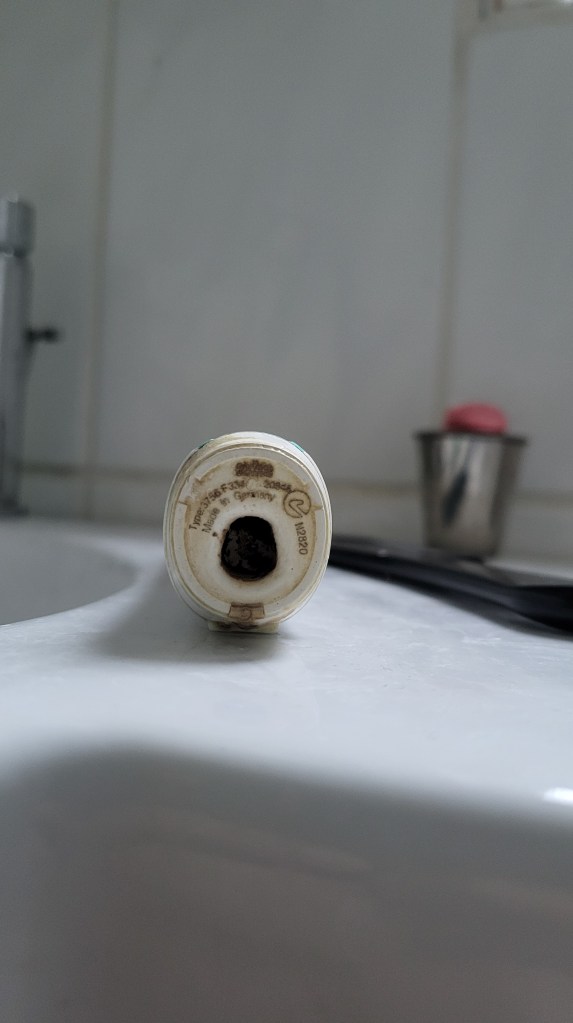
My old Braun Oral-B TriZone electric toothbrush – type 3756 shown on baseStill working after 10 years but battery only lasts 2-3 days
There are 3 things to consider – model, mode and brushes.
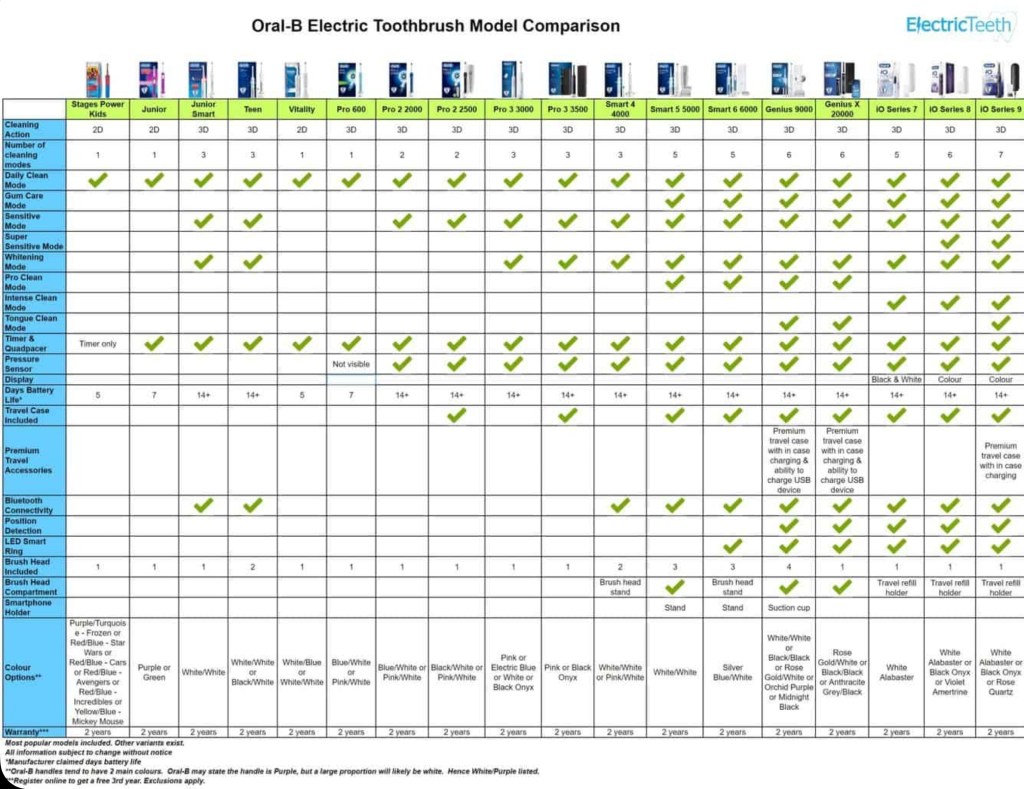
The Oral B Pro 3 and iO models are popular choices but what’s the difference and does the more expensive iO clean better?
Well the Pro 3 3500 is the same as the 3000 but includes a travel case and only comes in pink and black. The iO range has a magnetic motor which is quieter but its heads are over twice the price, not proven to clean better than the Pro 3 and not compatible with the heads of earlier Oral-B models.
The Pro 3 and iO both have the “3d Action” of oscillate (move back and forth), rotate and pulsate (vibrate against the tooth) but also a “Whitening” mode which varies oscillation speed up and down for deeper cleaning. There are further modes however all Pro3 and iO models also have “Daily Clean” and “Sensitive” modes and these 3 modes are sufficient for most people.
Finally onto heads. CrossAction heads have angled bristles for better cleaning though may be less comfortable than the basic Precision heads and the Floss Action head has micro pulse bristles for better interdental cleaning though doesn’t replace flossing. Some prefer the Deep sweep or trizone head which is shaped more like a manual toothbrush.
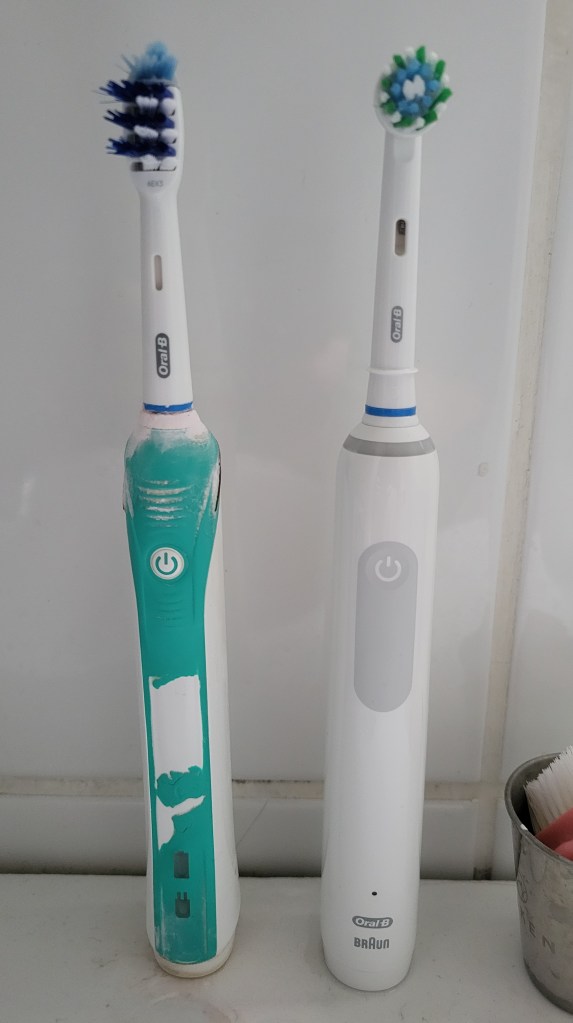
Old Oral-B Pro 2 2000 (Trizone head) v new Pro 3 3000 (CrossAction head)
Diagrams and details are available at electricteeth.com, animated-teeth.com and oralb.com:
This blog post is available in the YouTube short form if you’d rather hear it in 59 seconds.
If you were moved to tears by the 2023 John Lewis Christmas commercial “Snapper, the perfect tree” there are 6 hidden and not so obvious reasons the copywriters were able to tug so hard on your heartstrings.
The retailer has produced some of the most iconic Christmas ads of this century employing themes of friendship, generosity, tolerance, sharing and imagination but this sophisticated ad manages to cleverly combine all of these.
In a household with no obvious male influence the boy, like Elliott in Spielberg’s ET, is both nurtured by and nurturer, growing to understand fatherhood by becoming the protector and friend of this lonely and ostracised alien creature.
John Lewis Christmas commercials often uses cover versions of well known pieces to shift perspectives on the familiar and Andrea Bocelli’s new piece Festa uses theatrical repetition of the lyrics “la vita è una festa” – meaning “life is a celebration” – to provide an inspiring composition.
The retailer’s theme this year is the fusion of old and new festive traditions with the Saatchi strapline ‘Let Your Traditions Grow’, celebrating evolving and multicultural customs, finding joy with loved ones, whatever your traditions.
The plant is born helpless and needy but becomes an inspiration. This echoes the Christian nativity story. And the boy’s innocent recognition of goodness in the unusual is uncoloured by prejudice or preconceptions.
Popular opinion is mixed with right wing media commentary focusing on the lack of tradition and woke agendas but more liberal sources on the heartwarming celebration of difference – you can see below how different the comments are against the YouTube videos released by The Guardian and GBNews.
At a time when the UK has become more intolerant of strangers and difference than ever, with nationalism and exceptionalism having taken centre stage this seems like the perfect antidote and glimmer of hope of a welcome return to the sanity of the politically liberal mutual understanding and acceptance – like that of a boy and a carnivorous plant.
The best ads resonate, inspire and stay with us. I feel this one just might.
Transferring 10,000 photos from Windows to Android
Having recently upgraded to a new phone (Samsung S21 FE 5G 128GB) I wanted to transfer around 10,000 photos (30 GB) from my old phone to it.
My old phone had completely died and wouldn’t even turn on but my photos were happily safe on a micro SD card – a removable storage medium that the latest Samsung S series premium phones unfortunately no longer support.
I put the micro SD card into a a full size SD card adapter and then into a SD card reader which I plugged into my laptop’s USB 3 port and could see the photos on the card.
At the same time I plugged my new phone, via a USB C to USB A cable, into the laptop and could see the phone’s internal storage, where I had previously created a new folder (using the phone’s Files app) to transfer the files into.
As an aside, I created that new folder from the phone itself rather than from Windows File Explorer since when doing it the other way round I couldn’t see the newly created directory from the phone!
Unfortunately, when selecting the files in Windows (I sorted them in Windows File Explorer by file type and then picked just .jpg rather than the even more space hungry video files) and copy pasting them over to the Android folder the transfer was taking forever! The estimated time started at 2 hours and increased to over 6 hours.
It took so long that the connection to the phone dropped and the copy only got part way through, meaning I had to see how far through the copy had got, select the remaining files on my laptop and start the copy process again.
I did this a few times over a couple of hours before deciding to search for another more reliable approach!
There are numerous reports on forums and Q&A sites of this issue, like
with either no solution or just a suggestion that the slowness is due to limitations of the USB port or USB cable or file storage device or the file transfer protocol.
Files, typically 1 to 3 MB in size, were taking around 3 seconds each to copy over so transfer speed was around 40MB per minute or 2 GB per hour, far below the theoretical speed of the USB port and cable – even for USB 2 this is 70 GB per hour (and 4x that for USB 3).
With 30 GB of files, we were looking at around 15 hours! ..and that’s without the connection to the phone being lost, which was happening consistently around an hour into copying and therefore requiring my manual monitoring.
I noticed that some much larger 30 MB panoramic photo files were taking not much longer to copy than the much smaller typical 2 MB photo files, indicating a potential throughput of 10MB per second (600MB per minute) which was much more like it!
This confirmed that my USB cable’s throughput, which I was beginning to suspect (even though I had previously copied files the other way round, from my old phone to laptop, in reasonable time frames) was not the limiting factor, but rather something was happening that was related to the sheer number of files.
Maybe each file was being virus scanned by the phone or the file allocation table in the phone or indexing or integrity checking was the bottleneck but, whatever the reason, transferring via a zip file seemed a potential solution to reduce the number of individual files needing to be copied to the phone.
As it turned out zipping the files and transferring the zip file turned out to be exponentially faster – though there were a few gotchas!
Zipping around 1000 files into a 5 GB zip file took 10 minutes (it would have been much faster had I not run several zips of photos from different years at the same time) and then it took just 5 minutes to transfer the zip to the phone against the hour plus it would have taken to transfer them as as individual files.
So the last hurdle was unzipping them on the phone.
I tried the “Files By Google” app however this gave a disheartening error when trying to extract the files from the zip, making me think all was lost.
I googled the failure and came across the ZArchiver Android app which happily came to the rescue and was quickly and successfully able to extract all the files from the zip in around a minute.
So, say 15 minutes in total to zip, transfer and unzip 1000 files rather than the hour it was previously taking, a 4x speed increase in transferring multiple small files!
In fact I copied over the remaining 20 GB of files I had left to transfer in around half an hour rather than the 10 hours it would have taken so a 20x transfer speed increase.
Other options for transferring files from PC to phone include wireless ones like
uploading to a Cloud file storage service like Google Drive or OneDrive – if you don’t have enough storage free you can upload in batches
using file sharing apps like Google’s own Nearby Share – which uses WiFi and Bluetooth but requires installing and configuring software.
Yes, they were a bedrock metric that you based your KPIs on but they are no longer.
In UA (GA3) Google told us “unique pageview, as seen in the Content Overview report, aggregates pageviews that are generated by the same user during the same session. A unique pageview represents the number of sessions during which that page was viewed one or more times.”
In GA4 Google tells us simply there is no GA4 equivalent of the GA3 (UA) Unique Pageview, helpfully putting a ‘N/A’ in the GA4 column of the UA to GA4 mapping table, without so much as a by your leave.
So what metric do you use to see which pages get the most individuals looking at them?
Well looks like there is a ‘Users’ figure against pages which Google explains is “The number of distinct users who visited your website or app.”
I’ve found this new GA4 ‘users’ metric to show a significantly lower figure than the old UA ‘unique pageviews’ (UPV) figure, which may be because the latter was counting every user session where the page was viewed rather than just the unique users behind those sessions.
Who knows?
You can go to the Explore section on the left hand side of the GA4 menu and hand craft your own report of ‘sessions’ against pages but I found that yielded a figure similar to ‘users’ and markedly lower than the UPV figure I’d recorded for previous months.
Some will tell you there is a way to get those old UPV figures by combining user and session data using BigQuery. Easy huh?!
Erm, no. It’s gotten hard to get a UPV figure. But is that because Google wants you to spend time and money doing your own analysis of the data about your website they go to considerable lengths to collect and present? Or because it’s a dated concept they’d rather you didn’t use anymore?
My simple take is that at the end of the day, Google captures certain information during website page (and now app screen too) interactions and tries to present this to us in digestible, useable and familiar terms – so, for example, a user isn’t really a user in the sense of an individual person, it’s some recorded activity of pages being visited by a browser, storing a cookie on the device hosting it, within a certain amount of time since the last visiting of pages by that same browser.
Now as Google gets better at identifying real life actual users (e.g. through verified sign-ins to your own site, or even Google accounts) you may see an apparent decrease in users of your website, when in reality you are just seeing the consequence of Google Analytics more accurately counting users.
This is the quandary of data quality. Improving our data quality may mean we look like we’re doing worse in terms of the amount of data we’re collecting. So why try harder to improve data quality? I mean never mind the quality, feel the width. Unless that quality can ultimately lead you to better decisions..
Well, musings aside, I’m going with dropping UPV from my metrics in favour of the easier to report on users figure for now – but if you have a better understanding leave a comment and enlighten us all!
Excel function to generate a numeric unique ID (UID) for a person’s name.
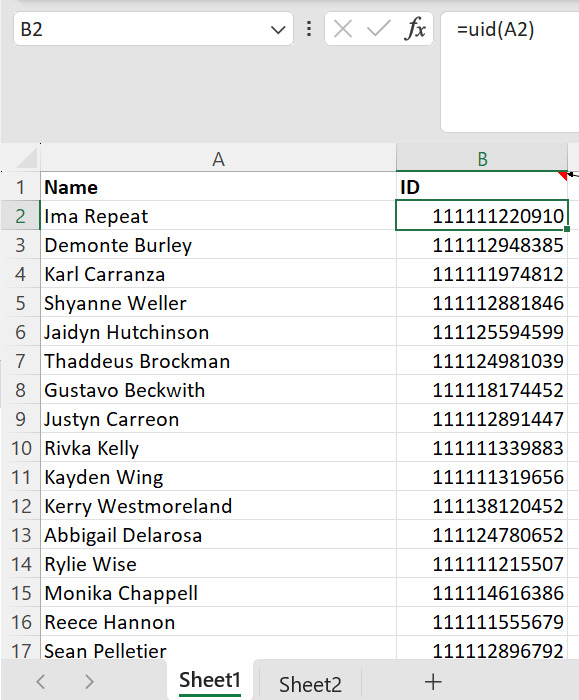
This simple Excel function magically generates a numeric unique identifier (UID) for each name in a data set.
It’s not just creating a random number for each name because the same name generates the same number each time.
And it’s not just assigning each name one of a handful of numbers because there are as many different numbers as there are names – as proven by the counts in D1 and E1 of the worksheet below.
Checking UIDs are in fact unique for your data set.
But where’s the documentation for this magic Excel “uid” function? And why would we even need it? Well let’s get into it.
Sometimes we need to store or present data about people without revealing any of their personally identifiable information (PII) like name, date of birth (DoB), address, email address, phone number, etc. but at the same time presenting a consistent and true picture of each person’s data. For example person 1 is a 6 foot 35 year old male from London and person 2 a 5 foot 82 year old woman from Edinburgh. This is commonly referred to as pseudonymous data, rather than anonymous data.
Pseudonymous data is data that has been de-identified from the data’s subject but can be re-identified as needed. Anonymous data is data that has been changed so that reidentification of the individual is impossible. Pseudonymisation is the process of replacing identifying information with codes, which can be linked back to the original person with extra information, whereas anonymisation is the irreversible process of rendering personal data non-personal, and not subject to the GDPR.
So we could create a simple mapping table with a number assigned to each individual person but that requires:
creating and then storing the mapping
ensuring we map just the unique individuals in our data so we have just one number per individual
maintaining and adding to the table every time a new person is added.
All rather cumbersome and time consuming.
What we could really do with is some function that magically converts their full name (or full name plus whatever other piece of data we hold about them, like DoB, to uniquely identify an individual) to a unique identifier – ideally numeric, which is easy to store and look up.
So here’s an Excel user-defined function that creates a reasonably unique numeric id or more accurately hash for a person’s full name.
I say reasonably because it’s not perfect and collisions are possible, by which I mean two different names could result in the same numeric ID being generated.
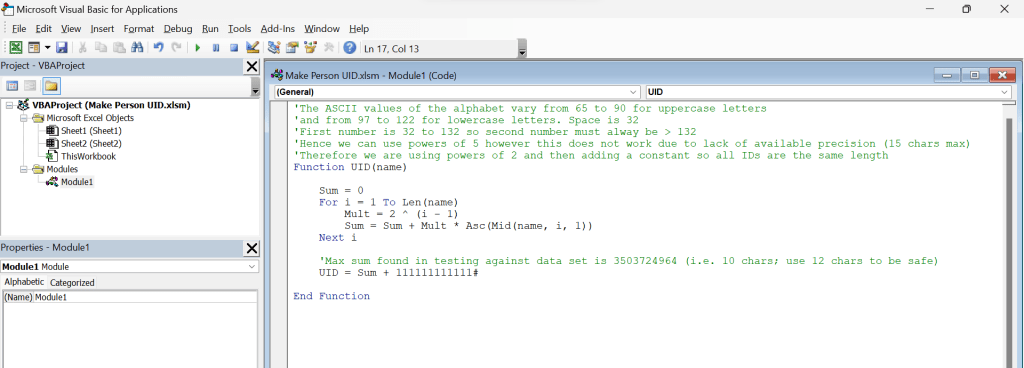
You create it using VBA (the programming language that comes as standard with Excel) and can then use the function in a cell just like any other built in Excel function. It can look as simple as this:
Excel UID user-defined function.
This function encodes each character of the name, together with the position of that character in the string. Each position would ideally generate numbers of a different scale so when added up they won’t interfere with the numbers from other character positions.
So to try to visualise this, if we used a 2-digit number (e.g. A=65) to represent each letter of the name then we could have the number for the name’s first letter occupy the units and tens columns of our UID, multiply the number for the name’s second letter by a hundred so it occupies the hundreds and thousands columns of the UID, multiply the number for the third letter by ten thousand and so on.
This idea is not novel e.g. an algorithm like this is considered here: Stackoverflow.com
The problem with this is that in Excel we can only record 15 digits of precision in a number so quickly run out of numbers meaning we can only record names up to 7 letters long.
By 15 digits of precision I mean that, if you have a number over 15 digits long not all of its digits are actually stored. For example, after 1 quadrillion (1,000,000,000,000,000) you lose the ability to store units so 1,000,000,000,000,001 is actually treated and stored in Excel exactly the same as 1,000,000,000,000,002 which increases the chance of collisions. You can see this for yourself by typing each of these numbers in different cells and entering a formula to subtract one from the other. You will see a difference of 0. Yes, Excel can lie to you!
To address this we use a smaller multiplier so we can encode a longer sequence of letters within the 1 quadrillion limit, however it is then possible for a character at one position to be encoded as exactly the same number as a character in a different position so there isn’t in fact a different total for every single permutation of letters one could encode, although the chance of two names in one’s actual dataset sharing the same total is low.
For example _A (a space followed by A) generates 32 + 2*65 = 162 but so does b_ (b followed by a space).
Now this UID function could in fact be used with any string but there is a limit to the length of the string before collisions become more likely and it is designed for text up to around 30 characters i.e. the typical maximum length of a person’s full name (first name and surname).
You could experiment with increasing the character position multiplier to reduce or eliminate the chance of collisions but that results in the generated ID number requiring more than 15 digits of precision more quickly as names get longer, which then increases the possibility of collisions so it’s swings and roundabouts.
Clearly there is a trade off between the length of string you can generate a UID for and the risk of collisions.
With real person names and datasets in the low hundreds of names I’ve found in its stock form it does a pretty good job of coming up with a different ID for every different name, though there is lots of room for further optimisation – possibly at the expense of more complicated code.
For example, you could imagine simply using an if else clause to assign a different number for every single real world known name. There are apparently around 30,000,000 different surnames and around 30,000,000 firstnames and hence 30,000,000 squared (9e+14) combos of first and last name – so with 15 digits we could perfectly encode every single one of those combos. The code for such a function would however be horrendous!
If you don’t need a purely numeric identifier then generating an alphanumeric identifier (i.e. including letters as well as numbers) would of course allow even more numerous representations within a given code length, however, again at the expense of more complicated code.
If you come up with a more efficient code generator that deals with longer names or reduces collisions please do leave a comment.
With this simple, and hence quick to run, function, although a unique ID is not guaranteed for each different name, you can easily and quickly test whether the function does in fact create unique IDs for your specific data set by running it for each person it contains (simply fill the function down as shown in the first screenshot above) and seeing whether you get the same number of unique IDs as you have unique individuals.
Just do an advanced filter on unique records for firstly the names of the individuals and then the generated IDs of those individuals and check whether there is the same number of rows of each – or alternatively use the Excel COUNTA and UNIQUE functions in combination as shown above (note that we use COUNTA rather than COUNT since COUNT only works with cells containing numbers and dates but not text).
If it doesn’t then you should be able to tweak the function’s code slightly so it does generate a unique ID for each name in your particular data set.
Now, considering your original data set, if your person full names, by themselves, don’t uniquely identify individuals you can concatenate to their name another piece of information about them, for example their DoB, and then run the function against that concatenated string.
Finally you can add a constant of your choosing to the number generated by the function to make all the IDs a consistent length and further obfuscate the relationship between name and ID.
Note: In VBA if we declare a variable without specifying the data type then the Variant data type is assigned by default (which requires more memory resources than most other variables). Types also have a shorthand and # is the shorthand for double. For more details see Data Type Summary.
You can change the function to make it easier to find individuals through their pseudonymised ID e.g. adding their initials before the generated number to make it easier to find a specific individual across various data sets. As a bonus, this also increases the uniqueness of the generated ID though of course the addition of alpha characters means that a numeric field can no longer be used to store the ID.
Just remember that if you change the function you then need to manually recalculate any cells that have already used your user defined function, by pressing ctrl-alt-f9 to force a workbook-wide recalculation. Pressing f9 alone is not enough, since that only recalculates cells marked as ‘dirty’ i.e. which refer to cells whose value has changed since the last calculation.
So, there you go. An approach to creating a simple Excel function that generates a unique number for every person name in your dataset.
Enjoy – and for more tech and wellbeing at the lowest price please subscribe 🙏
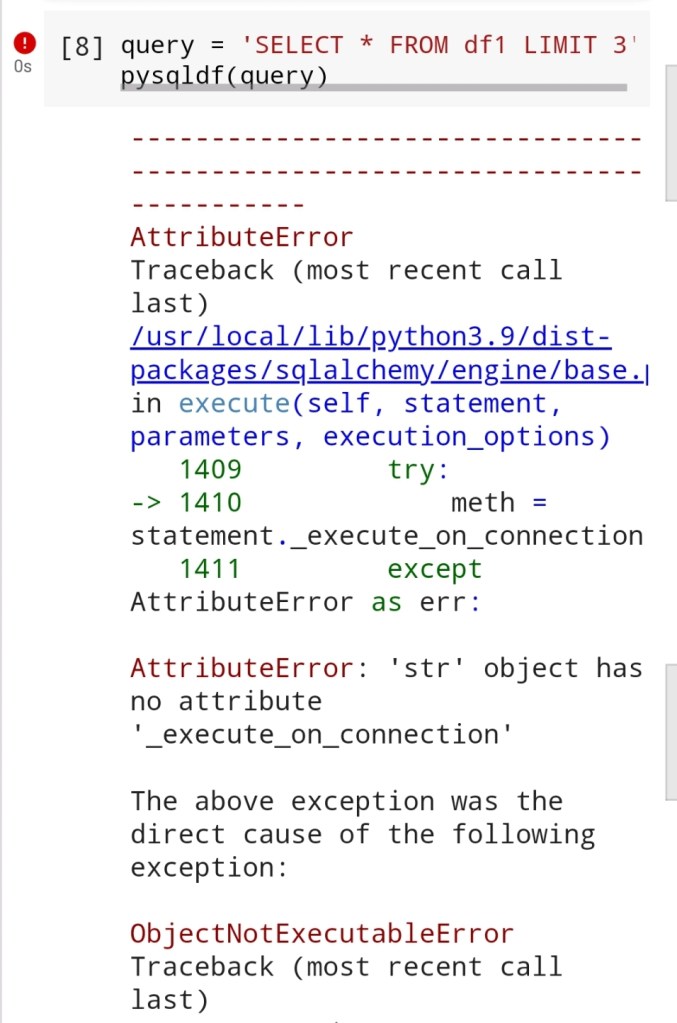
Last week a time-saving Python program I had been running successfully for several months in the Google Colab Jupyter notebook environment suddenly failed with a curious error.
The cause – an upgrade to a package (SQLAlchemy) that a library I was using (pandasql) depended upon had broken the library.
This was rather concerning since I had written a huge volume of code using the library and refactoring the code to do things a different way would have been a not insignificant undertaking.
Happily there are a couple of fixes. One is proposed in the link above which is to downgrade the package the broken library depends on before installing the library:
This is not entirely satisfactory since one can imagine a time when that downgraded version is no longer supported.
Ideally a fix would be released to pandasql itself but despite its popularity and widespread use it seems no changes have been made to it for several years so what are the chances of that happening..
Regardless of such stylistic, philosophical and aesthetic considerations, SQL remains one of the most established and popular languages for querying tabular data and rewriting existing code to use alternative methods, like the pandas query function can be time-consuming and will certainly require retesting.
I’ve experienced these unexpected failures of previously working code on occasion before e.g. where a package was completely removed from the base Colab distribution.
Happily the community developed a fix in that instance too.
So, running Python programs on Google Colab’s ever changing foundation remains a rather nerve wracking experience with unexpected work being required from time to time when things suddenly break and you need to research, implement and test fixes. If you know a better approach to managing the relentless and inevitable changes to Colab please leave a comment!
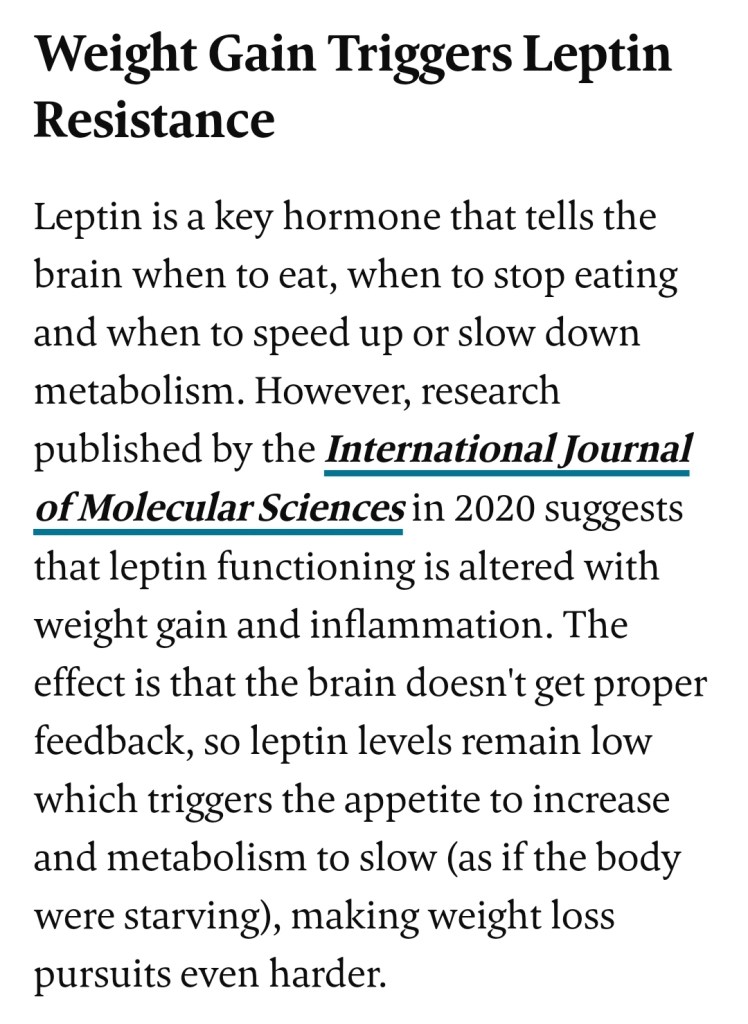
Being overweight actually keeps us feeling unsatisfied and overweight
Inflammation increases with weight gain, which leads to insulin resistance and leptin resistance. So, if you’re looking to lose weight, reducing inflammation is key. You can do this by avoiding processed foods and added sugars, eating more anti-inflammatory foods, getting enough sleep and decreasing stress levels. Reducing the amount of inflammation in your body will also lower your risk for diseases like cancer, heart disease and diabetes.
There is more to long term health and weight maintenance success than calories in and calories out. Check out these conversations by 2 London hospital doctors.
In a nutshell these resources help us understand the need to put good foods in (leafy greens, broccoli/cauliflower, nuts, fatty fish) as much as avoid bad foods.
How to lose weight
I wonder whether we may ‘self-medicate’ and become fat exactly in order to reduce our metabolism, feel tired and hence reduce troublesome thoughts.





 GI Chow